PowerShell offers a wide range of string manipulation methods, which can help you handle text efficiently in scripts and commands. Here’s a breakdown of common string methods with practical examples.
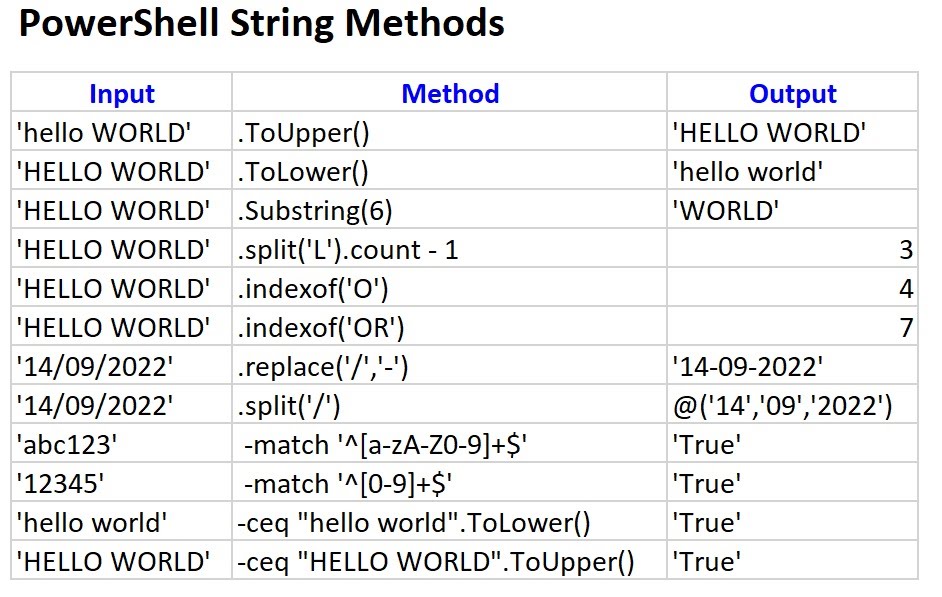
1. .ToUpper()
- Input:
'hello WORLD' - Method:
.ToUpper() - Output:
'HELLO WORLD' - Explanation: Converts all characters in the string to uppercase.
- Use Case: This is useful when you need to standardize text input, such as transforming user inputs to uppercase for case-insensitive comparisons.
2. .ToLower()
- Input:
'HELLO WORLD' - Method:
.ToLower() - Output:
'hello world' - Explanation: Converts all characters in the string to lowercase.
- Use Case: Ideal for converting text to lowercase before comparisons or for formatting purposes, like ensuring all emails are in lowercase.
3. .Substring()
- Input:
'HELLO WORLD' - Method:
.Substring(6) - Output:
'WORLD' - Explanation: Extracts part of the string starting from the specified index. In this case, it starts at the 6th index (7th character) and returns the rest of the string.
- Use Case: Commonly used when you need to trim or extract a specific portion of text, such as retrieving domain names from email addresses or cutting out irrelevant prefixes.
4. .Split() and Count
- Input:
'HELLO WORLD' - Method:
.split('L').count - 1 - Output:
3 - Explanation: Splits the string by the letter ‘L’ and counts how many times ‘L’ appears by subtracting 1 from the total split parts.
- Use Case: Useful for counting the occurrences of specific characters or words within a string.
5. .IndexOf() (Single Character)
- Input:
'HELLO WORLD' - Method:
.IndexOf('O') - Output:
4 - Explanation: Finds the position of the first occurrence of the character ‘O’ in the string. Positions start from 0.
- Use Case: This method is helpful when you need to find the location of a specific character or substring within a string, such as locating a delimiter in a file path.
6. .IndexOf() (Substring)
- Input:
'HELLO WORLD' - Method:
.IndexOf('OR') - Output:
7 - Explanation: Finds the position of the first occurrence of the substring
'OR'in the string. - Use Case: Similar to the previous method, but useful when searching for a multi-character substring.
7. .Replace()
- Input:
'14/09/2022' - Method:
.replace('/', '-') - Output:
'14-09-2022' - Explanation: Replaces all occurrences of the
/character with-in the string. - Use Case: Very useful for formatting strings. For example, you might use it to replace slashes in dates or convert specific characters to make strings URL-safe.
8. .Split()
- Input:
'14/09/2022' - Method:
.split('/') - Output:
@('14', '09', '2022') - Explanation: Splits the string into an array of substrings based on the delimiter
/. - Use Case: This method is handy for parsing strings like dates, file paths, or comma-separated values into individual components.
9. Regular Expression Match (Alphanumeric)
- Input:
'abc123' - Method:
-match '^[a-zA-Z0-9]+$' - Output:
True - Explanation: The
-matchoperator checks if the string contains only alphanumeric characters (a-z, A-Z, 0-9). - Use Case: Use this when validating that a string consists of only alphanumeric characters, such as when checking usernames or passwords.
10. Regular Expression Match (Numeric)
- Input:
'12345' - Method:
-match '^[0-9]+$' - Output:
True - Explanation: The
-matchoperator checks if the string contains only numeric characters (0-9). - Use Case: Helpful for validating if a string is purely numeric, such as when checking for valid numeric input.
11. Case-Insensitive Equality (Lowercase)
- Input:
'hello world' - Method:
-ceq "hello WORLD".ToLower() - Output:
True - Explanation: The
-ceqoperator performs a case-insensitive comparison. In this case, it compares'hello world'with the lowercase version of'hello WORLD'. - Use Case: Use this when comparing strings without worrying about their case, such as comparing user input to predefined values.
12. Case-Insensitive Equality (Uppercase)
- Input:
'HELLO WORLD' - Method:
-ceq "HELLO WORLD".ToUpper() - Output:
True - Explanation: Similar to the previous example, this compares two strings in an uppercase format using
-ceqfor case-insensitive comparison. - Use Case: This is useful when you want to ensure two strings are equal without considering the case.
Practical Use Cases
These methods are widely applicable across different scenarios in PowerShell scripting:
- Text Normalization: Use
.ToUpper()or.ToLower()to normalize input data (e.g., ensuring email addresses or usernames are compared case-insensitively). - Substring Extraction: The
.Substring()method is essential for extracting key pieces of information, such as parts of a filename or domain from a URL. - Pattern Matching: Regular expression matching (
-match) is powerful for validating formats such as email addresses, phone numbers, or alphanumeric values. - Data Parsing: Methods like
.Split()and.Replace()are ideal for parsing log files, CSV data, or reformatting dates, especially when dealing with different formats. - Indexing:
.IndexOf()helps in finding the position of delimiters or markers within a string, which is essential when navigating through structured data such as JSON or XML strings.
Credit @Dhinke for the image for the post.